
Up to 50 Facebookers can now collaborate on one single photo album – from a company event to launching a new product – with a new feature called “Shared Albums.”
The last week of August the social-network giant announced the new feature, which lets up to 50 users contribute pictures to the same album (this does not apply to albums for Pages).
The album creator can share access to as many as 50 “contributors,” who can each in turn share up to 200 photos.
Album creators can choose a setting that allows contributors to invite others to the album, or retain total control over album invitations. Previously, users could only upload photos to albums they created, and each album was limited to 1,000 total photos.
How do you set up a shared album?
Log in to Facebook, click on the “Photos” tab to the far left of the News Feed or at the top of your profile page. You will be taken to your stream of photos, where you will see a “Create Album” tab in the top right-hand corner; click that.
Select the photos that you want to upload from your computer (you can add more pictures later). As with any other photo album, you’ll be prompted to fill out information about the album you’re creating. Feel free to include as little or as much about the album as you want. In order to use the shared albums feature, you need to click the “Post Photos” button in the lower right-hand corner.

At the top of the next screen, you will have the option to make the album a shared album by clicking on the button in the upper left-hand corner. You will then be able to search for, and add up to 50 of your Facebook friends as “contributors” to the album. This is also where you’ll want to take a moment to explore the album’s privacy settings.
A shared album has three settings: public, friends of contributors and contributors only. You can also decide whether you want to allow contributors to invite others to the album. Deselecting the blue check box below the list of contributors will ensure that the album creator is the only user who is able to invite others to post photos in the album.
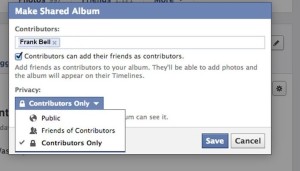
If you need, you can go back and make changes to a shared album. Just open the album, and click on the “Edit” button in the upper right corner. You will then be able to remove or add contributors, change the album title or description, and alter privacy settings.
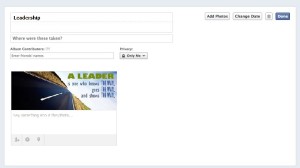
Currently, this Facebook’s newest feature is limited to select users. The company began rolling out shared photo albums to a small group and will expand to all English members before opening the feature to international members.